

Can you really afford to not be prepared for the unexpected?

Incident Report Template
+
Free Health and Safety Policy Template
+
Free Incident Form Template

USD $17.00
Shop with Full Confidence
90-Day Full Money-back Guarantee


Features
100% secure shopping ✔
Secure Digital Delivery by E-Junkie ✔
Easy-to-use MS Word template ✔
Page Count 8 ✔
Word Count 587 ✔
Automated Table of Contents ✔
Free Health and Safety Policy Template ✔
Free Incident Form Template ✔
No complex software needed ✔
No subscriptions ✔
90-day Full Money Back Guarantee ✔
Instant Download ✔

Are you ready to risk your business by neglecting proper records?
When an incident occurs, do you have a reliable process to document it in case authorities or stakeholders need to be informed?
Taking incident reporting seriously is essential to protecting your business and ensuring your team is fully prepared for any situation.
Failing to record incidents can lead to unnecessary stress, legal complications, and the constant worry of being unprepared when things go wrong.
Can you really afford to not be prepared for the unexpected?
What are you willing to risk?
Are you prepared to jeopardize your profitability and endure further stress just because key records weren’t completed?
Incidents are challenging enough on their own. Without proper procedures in place, you leave your business exposed to even greater problems.
By having a clear, effective process for documenting incidents, you can significantly reduce stress and protect your business from potential fallout.
Don’t take unnecessary risks – implement the right procedures today and safeguard your business from further harm.
3 Critical Reasons to Record Every Incident
1. Compliance with Authorities
If something goes wrong, having detailed, accurate records is essential for demonstrating compliance to the relevant authorities. Proper documentation protects your business in case of legal scrutiny.
2. Showcase Professionalism
How professional is your business? In today’s competitive landscape, maintaining a high standard of professionalism is non-negotiable. Properly recorded incidents reflect your commitment to running a credible, reliable operation.
3. Peace of Mind
Being a responsible business means taking proactive steps to safeguard your reputation. Recording incidents shows you care about accountability, ethics, and the long-term success of your business.
Save Time with the Incident Report Template
Our Incident Report Template is designed to save you valuable time and effort when creating thorough incident reports. It’s quick, customizable, and ready for immediate use.
Title Page
The first page is a customizable title page, where you can easily add your business and project details, giving your reports a professional and tailored touch.

Table of Contents
The next page is the Table of Contents. This is a fully automated table of contents created in Microsoft Word using Microsoft Word’s automatic Table of Contents feature.

Section 1 – General Details
Section 1 is a place for a summary of the report and the general details of the report and incident. Items to be customized are shown in red. This is an 8 page template.

Section 2 – Incident Details
Section 2 is a place to record the incident details.

This template has 5 sections in total. Refer to the Table of Contents for all sections.
What is Included?
Incident Report Template
Microsoft Word .docx
Page Count
8
Word Count
587

Free Bonus No.1
Health and Safety Policy Template
When you purchase the Incident Report Template above you also receive a Health and Safety Policy Template free.
The following page is the title page.

Health and Safety Policy
Review the detail of the health and safety policy below.

Free Bonus No.2
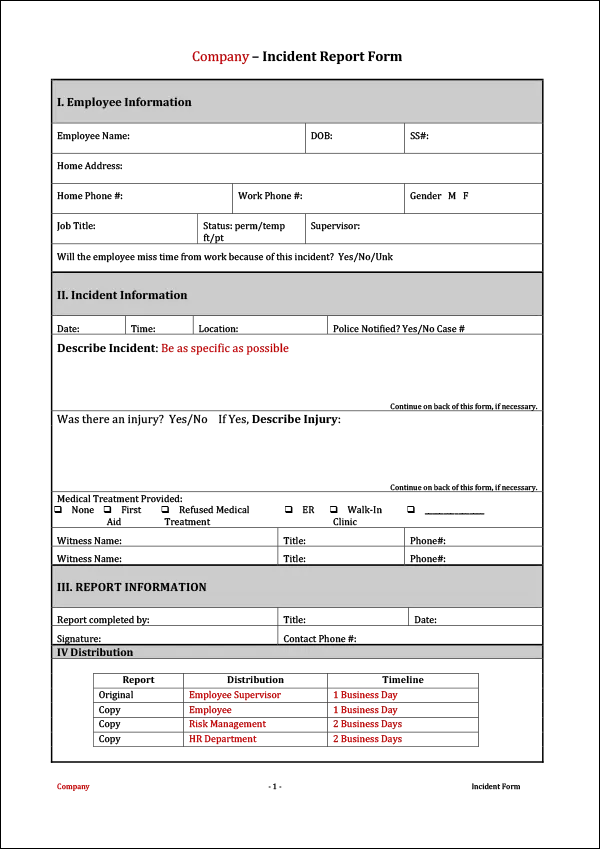
Incident Report Form Template
Free bonus No.2 is an Incident Report Form Template.
This incident report form template is suitable to record incidents should they occur.
Total Inclusions
Incident Report Template
Microsoft Word .docx
Page Count
8
Word Count
587
Health and Safety Policy Template
Microsoft Word .docx
Page Count
3
Word Count
538
Incident Form Template
Microsoft Word .docx
Page Count
1
Word Count
150

What Our Customers Are Saying
by Tariq
David,
You and your team have done an awesome job with the site and these templates. They are really useful and a time saver. I wish if you could divide them in different categories and have different bundles, it might be easier for users to navigate and decide which one to buy.
Anyway, awesome site, awesome content, and thank you for helping me out.
Best regards,
Tariq
by Adam Grancell
Buying something off the internet always comes with a certain amount of risk. I had full confidence buying this template from you because firstly it is through Paypal and secondly, you offer a 100% money back guarantee if I am not happy.
However, I didn’t need to request a refund because it was perfect for my needs. Thank you for saving me “tons” of time!
Adam Grancell
Fast Project Systems
Canada
by Farai Mutambanengwe
Simple, hassle-free, effective!
Like other reviewers here, I too was looking for a no-frills Standard Operating Procedures template, and when I got to David’s site, that was exactly what I saw, a purpose-made template that cuts to the chase and delivers exactly what any small business needs. Dave was also able to respond very quickly and generously to a peculiar request that I made via e-mail, so you can be assured there is a great human face behind the site 🙂 . Totally delighted with my purchase, and I strongly recommend these templates particularly for small and growing businesses looking to standardise their processes quickly.
by Joumana
Thank you I have seen your YouTube videos and they have been a great help to me. Thanks.
Joumana.
by Lee
Thank you! I love the document and it is perfect for what I am working on.
Sincerely,
Lee
Fast, Professional Results – No Hassle
Time-Saving Templates for Busy Professionals
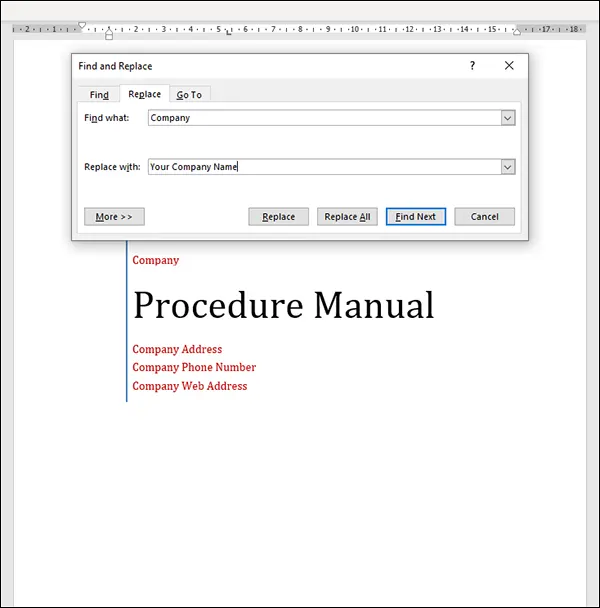
Our templates are built for speed and simplicity. Just open them in Microsoft Word, follow the red highlights, and
customize them to fit your business in minutes.
Red Highlights Make Editing Easy
Every section that needs your input is clearly marked in red. You can:
Use Find and Replace (Ctrl+H) to update everything in one go,
or
Scroll through and edit each red-highlighted item manually.
No guesswork. No confusion. Just fast, accurate customization.
Risk Free 100% Full Money-back Guarantee
Guarantee #1 – Our Rock-Solid Promise
We’re confident our templates will save you time and improve your business. But if you’re not completely satisfied for any reason,
we’ll give you a full refund – no questions asked.
Our templates are designed to streamline your document creation process, helping you work faster, smarter, and more efficiently.
And if they don’t deliver, you’re fully protected.
No strings. No stress. Just results – or your money back.
Easy to Purchase ✔
Instant Download ✔
100% Safe and Secure Checkout ✔
Simple to Customize & Use ✔
90-Day Full Money-Back Guarantee ✔
No Questions Asked ✔
Guarantee #2 – PayPal Buyer Protection

Your purchase is also protected by PayPal Buyer Protection.
This means you can pay with confidence, knowing that if anything goes wrong, PayPal will ensure you receive a full refund.
Whether you’re using a credit card or PayPal balance, you’re backed by one of the world’s most trusted and secure payment systems.

You can download the templates instantly after purchase.

USD $17.00
Shop with Full Confidence
90-Day Full Money-back Guarantee
Don’t waste valuable time starting from scratch – our incident report template streamlines the process, so you can focus on what truly matters: running your business.
Take action now and ensure you’re always prepared for any situation.
Regards,

David
P.S. The price of our products do rise based on upgrades, improvements and demand. We encourage you to buy today not only to avoid missing out at this price, but to also save a significant amount of time creating your incident forms and reports.
Frequently Asked Questions for Incident Reports
What should be included in an Incident Report?
An Incident Report should record important details about what happened, when and where the incident occurred, the people involved, witnesses, injuries or damage, immediate actions taken, and any follow-up actions required.
Why is an Incident Report important?
An Incident Report provides a consistent way to document workplace incidents, accidents, injuries, property damage, customer incidents, and other unexpected events. A clear report can help management understand what happened, investigate the circumstances, identify corrective actions, and maintain accurate records.
Can I customise this Incident Report Template for my business?
Yes. The Incident Report Template can be customised to suit your business, workplace procedures, reporting requirements, incident types, employee responsibilities, and internal processes.
Does the Table of Contents update automatically?
Yes. We have used automated fields. If you delete a section or add 10 new pages, you simply right-click the Table of Contents and select “Update Field” to keep your page numbers perfect.
How do I receive the files?
Immediately after payment, you will receive an email with a link to a .ZIP file. Simply download and “Unzip” the folder to access all the Word and Excel files.
Do I need a PayPal account?
No. You can pay securely with any major Credit Card (via Stripe) or use PayPal if you prefer.
Is this complicated software or a subscription?
No. This is a standard Microsoft Word document. There are no monthly fees, no logins, and no complex software to learn. You buy it once, you own it forever.
Does an Incident Report help with workplace compliance?
An Incident Report can help support your business’s record-keeping and workplace procedures by providing a consistent way to document incidents and the actions taken afterwards. However, businesses should ensure their reporting procedures meet the specific legal and regulatory requirements that apply to their workplace.
Will unexpected fine print charges be added to my order without my knowledge?
No. There are no further charges. No monthly subscriptions either. You have the right to use the templates within our terms of agreement of purchase. There are no hidden charges. Similarly, what you see above is the only and final fee.
Will anyone respond if I have problems after buying?
Yes. However, there may be a delay in our response. Depending on your country timezone, we will respond as soon as we can. Please note, we aim to respond to your requests within the shortest possible time.
Will it be easy to dispute or cancel my transaction?
Yes. If you are not 100% satisfied with your purchase, we will refund your money 100%. However, we would love some feedback from you so we can improve our product should you believe it could be better.
I did not receive a download link after paying
Please do not panic. e-Junkie is a reliable document delivery system and it is unlikely this will occur. The file you are downloading is a .ZIP file. However, if you have any issues, we will email you the download link as soon as we can.
The website briefly redirected through e-Junkie. Is this safe?
Yes, it is safe. When you click on the Proceed to Pay button, you will be redirected briefly through e-Junkie.com to Paypal.com or Stripe.com (Credit Card Payment) depending on how you choose to pay. We use e-Junkie to deliver our documents electronically so you receive them immediately – 24 Hours a day, 7 days a week.
Can the Incident Report Template be used for accidents and injuries?
Yes. The template can be adapted to document workplace accidents, injuries, near misses, property damage, customer incidents, equipment incidents, and other events relevant to your business.
How does an Incident Report improve workplace management?
An Incident Report gives management a clear written record of what happened and what action was taken. This can make it easier to identify recurring problems, follow up on corrective actions, and improve workplace procedures and safety practices.
Incident Report Template – What Should It Include?
An Incident Report Template provides a consistent way to document an unexpected event, accident, injury, near miss, property damage or other incident that occurs within a business or workplace.
When something goes wrong, it is important to record the facts while they are still fresh. A written incident report gives management a clear record of what happened, who was involved, where and when the incident occurred, what action was taken and whether any further investigation or corrective action is required.
An incident report should focus on recording the facts clearly and accurately rather than making assumptions about who was responsible.
What Should Be Included in an Incident Report?
The exact information required will depend on the type of incident and your business, but a useful Incident Report Form can include:
- Date and time of the incident
- Location of the incident
- Description of what happened
- Names of people involved
- Names of witnesses
- Details of any injury or illness
- Details of property or equipment damage
- Immediate action taken
- First aid provided
- Details of any photographs or supporting information
- People notified about the incident
- Follow-up actions required
- Corrective actions
- Investigation findings
- Date the report was completed
- Name and signature of the person completing the report
The report should be adapted to suit your business, workplace and the types of incidents that could occur.
What Is an Incident Report?
An incident report is a written record of an event that requires attention, investigation or follow-up.
An incident does not necessarily have to involve an injury.
Depending on your business, an incident report may be used for:
- Workplace accidents
- Employee injuries
- Customer injuries
- Near misses
- Property damage
- Equipment damage
- Vehicle incidents
- Security incidents
- Workplace hazards
- Environmental incidents
- Product or service incidents
- Other unexpected events
Recording these events gives your business a consistent process for dealing with problems when they occur.
Incident Report vs Accident Report
The terms incident report and accident report are sometimes used interchangeably, but they do not necessarily mean exactly the same thing.
An accident generally refers to an event that results in injury, illness, damage or other harm.
An incident can be broader and may include events where nobody was injured or nothing was damaged.
For example, an employee slipping on a wet floor but not being injured could be recorded as a near miss or incident. If the employee was injured, the event may also be recorded as a workplace accident.
The terminology and reporting requirements will depend on your business and the laws and regulations that apply to your workplace.
Why Is Incident Reporting Important?
A consistent incident reporting process helps a business create a reliable record of what happened.
Without written records, important details can be forgotten or become unclear over time.
An incident report can help management:
- Understand what happened
- Identify hazards and recurring problems
- Determine whether further investigation is required
- Record immediate action taken
- Identify corrective actions
- Follow up on outstanding issues
- Improve workplace procedures
- Monitor recurring incidents
- Maintain appropriate business records
The purpose is not simply to fill out a form. The information recorded can help your business learn from incidents and reduce the likelihood of similar events occurring again.
What Is a Workplace Incident Report?
A Workplace Incident Report is used to document an incident that occurs in a workplace.
This could include an employee injury, workplace accident, near miss, equipment failure, hazardous condition, customer incident or property damage.
For example, if an employee is injured while using workplace equipment, the incident report could document where and when the incident occurred, what the employee was doing, what happened, whether anyone witnessed the event, what immediate action was taken and what follow-up is required.
A workplace incident report should provide a factual record rather than simply stating that an incident occurred.
What Is a Near Miss Report?
A near miss report documents an event that could have resulted in an injury, accident, damage or other unwanted outcome but did not.
Near misses are worth recording because they can identify hazards before someone is actually injured.
For example, if a worker trips over an extension cord but does not fall, the event could still be recorded as a near miss.
Recording near misses can help identify patterns and highlight areas where workplace procedures, equipment, training or controls may need to be reviewed.
Incident Investigation and Corrective Action
Completing an incident report is often only the first step.
Depending on the seriousness of the event, your business may need to investigate what happened and determine whether corrective action is required.
Corrective action could involve:
- Repairing damaged equipment
- Removing a workplace hazard
- Changing a procedure
- Providing additional employee training
- Improving signage
- Reviewing supervision
- Updating workplace policies
- Introducing additional safety controls
The incident report provides a starting point for this process by documenting the event and the actions taken.
Who Should Complete an Incident Report?
The person responsible for completing an incident report will depend on your business and its internal procedures.
It may be completed by an employee involved in the incident, a supervisor, manager, safety representative or another person responsible for incident reporting.
Your business should establish a clear process so employees know who to notify and what they need to do when an incident occurs.
It is also important that employees understand that incidents should be reported promptly rather than waiting until later when details may be forgotten.
Incident Report Template for Small Businesses
Small businesses can benefit from having a simple incident reporting process.
You do not necessarily need complicated software to document incidents. A well-designed Incident Report Template in Microsoft Word can provide a straightforward starting point.
The important thing is having a consistent process that your employees understand and that can be adapted to your particular business.
The template can also be modified as your business grows or your incident reporting requirements change.
Is an Incident Report Required by Law?
Whether an incident must be reported, what information must be recorded and who must be notified depends on the type of incident, your location, your industry and the laws and regulations that apply to your business.
Some workplace incidents may have specific notification or record-keeping requirements.
This Incident Report Template is a general business document and should be reviewed and customised to suit your particular circumstances. It should not be treated as legal advice or as a substitute for any reporting obligations that apply to your business.
Create Your Incident Reports in Microsoft Word
You don’t need to create an incident report from a completely blank page every time something happens.
This Incident Report Template provides an 8-page Microsoft Word document that gives you a structured starting point for recording incidents.
The template includes sections for general information and incident details, with additional sections covering the reporting process.
You can customise the document with your business name, procedures, reporting requirements and other information relevant to your workplace.
You also receive a Free Health and Safety Policy Template and a Free Incident Form Template with your purchase.
The result is a practical set of documents you can use as a starting point for developing a consistent incident reporting process for your business.
USD $17.00
Shop with Full Confidence
90-Day Full Money-back Guarantee