

Operating a business without an Operations Manual is like driving a ship without a rudder – aimlessly drifting – unable to steer or stay on course with no direction or control.
The result is chaos and inefficiency.
Download an Operations Manual Template + Free Templates.

Table of Contents
What is an Operations Manual?
An operations manual is a document that explains how a business runs day to day.
Departments, processes, roles, and standard procedures, gathered into one structured reference.
Build it well and it becomes the single source of truth your whole team can follow.
The 8 Core Areas Every Operations Manual Should Cover
Creating an Operations Manual forces you to consider all areas of your business rather than just the areas you are good at, or most passionate about.
If built correctly, an Operations Manual will make a valuable difference to the performance of your business.
The following are 8 important departments of any typical business. You can reflect these in your Operations Manual table of contents.
Core Business Operations Manual Structure
The following eight departments form the backbone of a typical Operations Manual and should be reflected in your table of contents.
💡 Tip
Start with 8 Core Sections. No matter the size of your business, every operations manual can start with the same foundational 8 departments, then you can develop it further from there.
Create the Main Sections by Drafting Your Operations Manual Table of Contents
Whether you’re using a free operations manual template or creating one from scratch, start by drafting the table of contents.
This step helps you plan the structure of your manual and ensures the final document is practical, organized, and useful for your team.
The following could be the main sections or chapters with the sub-sections listed further below.
- Company Introduction
- Mission, Vision & Values Manual
- Administration Manual
- Finance Manual
- Human Resources Manual
- Operations/Production Manual
- Emergency Manual
- Marketing Manual
The level of detail in your Operations Manual will really depend on your business, how complex it is, what you produce, and how it operates.
However, you can pretty well assume that you will need the fundamentals.
Take some time to list out the main business units or departments in your business.
⚠️ Important
Small Business? If you have a small business, don’t get too carried away with lots of detail. Chances are no-one will read it. Just keep it simple, effective and straight to the point.
Further Essential Sub-Sections for your Operations Manual Table of Contents
Once you have determined the main areas or departments of your business as per above, then you can consider each area in more detail.
There is likely to be a huge amount of detail required, however you can certainly obtain a lot of this information online or simply purchase a ready made Operations Manual Template.
The additional sub-sections outlined below is for a typical business, so it may not apply to your business.
Generally, there are aspects of most businesses that are the same. Depending on how large your business is, will depend on how many sub-sections you create.
💡 Tip
Break Sections into Sub-Sections. Once you’ve established the core sections, add sub-sections to capture all the key processes, responsibilities, and procedures within each department for clarity and usability.
Sub-sections of an Operations Manual
The following is a really brief outline of additional sub-sections of an Operations Manual.
Business Operations Manual – Full System Architecture
Company Introduction
Overview, history, legal structure, services, org chart, culture, locations, contacts.
Mission, Vision & Values
Strategy, goals, ethics, behaviours, culture alignment, and sustainability principles.
Administration Manual
Office systems, document control, communication, IT, meetings, travel, admin roles.
Finance Manual
Accounting, payroll, budgeting, AP/AR, reporting, tax, audits, controls.
Human Resources Manual
Recruitment, onboarding, roles, performance, leave, WHS, conduct, termination.
Operations Manual
Workflows, SOPs, quality control, tools, inventory, suppliers, scheduling, improvement.
Emergency Manual
Safety, evacuation, fire, medical response, security, incidents, disaster recovery.
Marketing Manual
Strategy, branding, ads, digital marketing, content, research, PR, customer engagement.
The following are all the sections or chapters and sub-sections in a list that you can simply copy and paste.
Section 1: Company Introduction
- Company Overview
- History & Background
- Legal Structure & Ownership
- Products & Services Overview
- Organizational Structure (Org Chart)
- Key Locations / Facilities
- Company Culture & Workplace Environment
- Contact Information & Key Personnel
Section 2: Mission, Vision and Values Manual
- Mission Statement
- Vision Statement
- Core Values & Behaviors
- How Values Translate to Daily Operations
- Company Goals & Strategic Objectives
- Code of Conduct / Ethics Overview
- Sustainability / Social Responsibility Guidelines (if applicable)
Section 3: Administration Manual
- Office Policies & Procedures
- Document & Record Management
- Communication Protocols (Internal & External)
- IT & Systems Guidelines
- Meeting Protocols & Reporting
- Mail, Courier, and Delivery Procedures
- Travel & Expense Procedures
- Administrative Roles & Responsibilities
Section 4: Finance Manual
- Accounting Policies & Procedures
- Budgeting & Forecasting Guidelines
- Accounts Payable & Receivable
- Payroll Procedures
- Expense Reporting & Reimbursements
- Financial Reporting & Record-Keeping
- Tax Compliance & Filing Procedures
- Auditing Policies & Controls
Section 5: Human Resources Manual
- Recruitment & Hiring Procedures
- Employee On-boarding & Orientation
- Job Descriptions & Role Expectations
- Performance Reviews & Promotions
- Employee Benefits & Entitlements
- Leave & Attendance Policies
- Workplace Health & Safety
- Employee Conduct & Disciplinary Procedures
- Termination & Exit Procedures
Section 6: Production or Operations Process Manual
- Production Workflow / Process Overview
- Quality Assurance & Control Procedures
- Equipment & Tools Guidelines
- Inventory Management
- Supplier & Vendor Management
- Scheduling & Resource Allocation
- Standard Operating Procedures (SOPs)
- Continuous Improvement & Reporting
Section 7: Emergency Manual
- Emergency Contact List
- Evacuation Procedures
- Fire Safety Guidelines
- First Aid & Medical Emergency Protocols
- Security & Threat Response
- Business Continuity & Disaster Recovery Plan
- Reporting Incidents & Near Misses
Section 8: Marketing Manual
- Marketing Strategy & Objectives
- Brand Guidelines & Voice
- Advertising & Promotions
- Digital Marketing Procedures (Website, Social, Email)
- Content Creation & Approval Process
- Market Research & Competitor Analysis
- Customer Engagement & Feedback
- Public Relations & Media Guidelines
You may need to break your operations down into separate files as it will become large quickly.
Either way, you should start off by setting the direction of your business with Mission and Vision Statements and then progress to the general details and safety requirements.
Then after that, you can jump into standard procedures and detailed tasks.
How big will your Operations Manual be?
The size of your business is likely to determine the physical size or format of your Operations Manual.
Whether you have 8 separate documented manuals for each area, or you create one MS Word document with 8 separate sections – or you create an online platform, it doesn’t really matter.
It will of course depend on the size of your business and the speed of its growth.
Read more about Operations Manuals at our comprehensive guide about Operations Manuals.
You can also learn more about Operations Manuals at Wikipedia – Operations Manual
Operations Manual Table of Contents Outline – A Ready-to-Use Example
Below is a very simple Operations Manual table of contents example.
If you need a more complex and detailed Operations Manual, then consider the template we sell on this website – Operations Manual Template + Free Templates
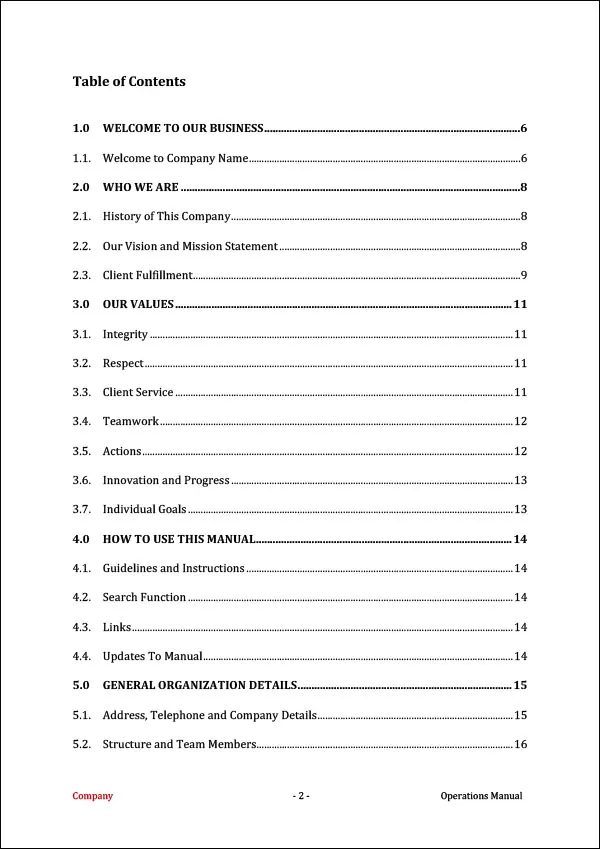
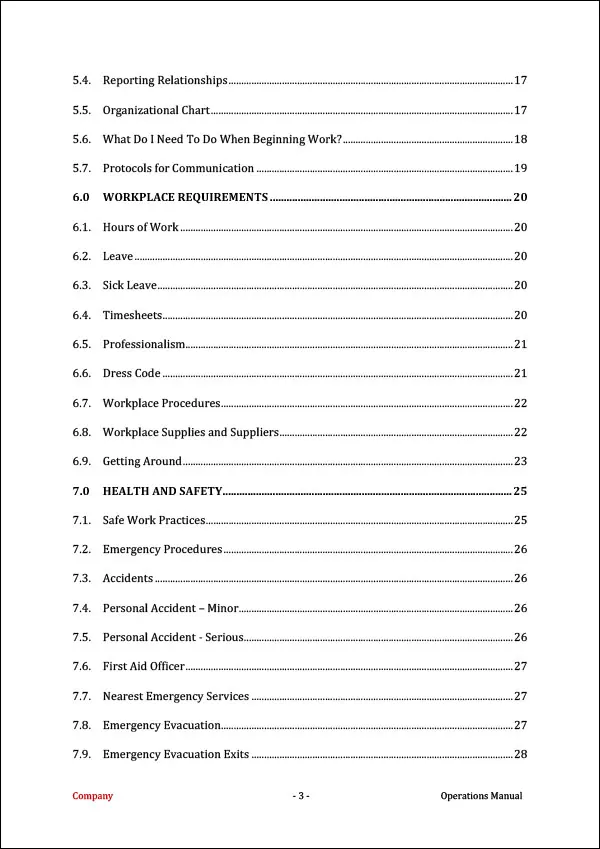
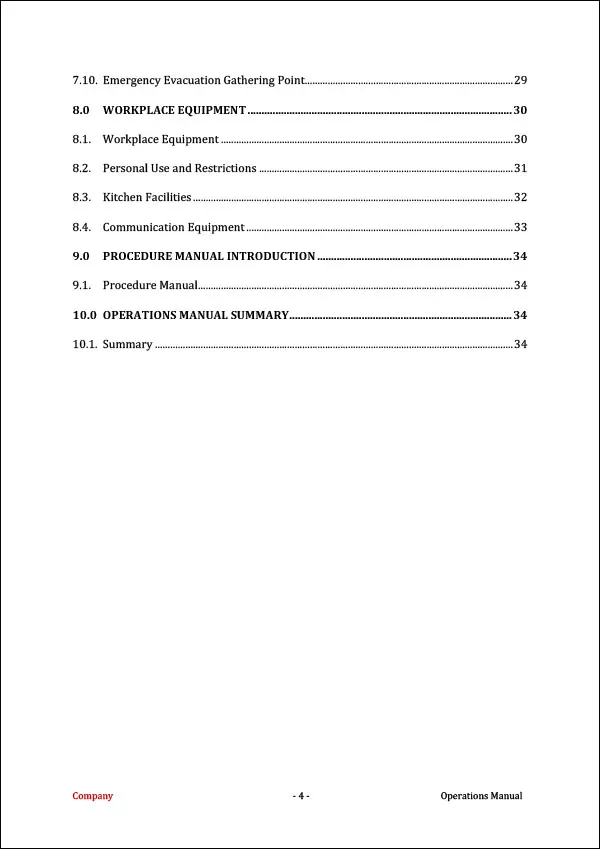
Whether you use something like the above, are trying to find a free operations manual template, or you go for something more complex, either way it is a good idea to plan for future growth by ensuring you have a system set up for your team to follow.
From improving efficiency almost overnight and helping to maintain consistency across the business in all areas, through to training new employees efficiently – an Operations Manual will bring many benefits to your team and organization.
Don’t Just Write an Operations Manual – Build One That Improves Your Business
A table of contents will help you plan your manual and allow you to create a ‘birds eye view’ of the overall content.
If you list out each section – and then sub-sections – you will quickly be well on your way to creating an Operations Manual that is useful and relevant.
However, will anyone actually read it? Its a really good question becuase chances are your team members may not even look at it.
The key to make it successful is to provide a platform that suits your business so your team members actually refer to it because they find it useful.
This could be an online system or a mobile system or simply printed documents.
The last thing any team needs is useless paperwork that no one wants to read or use. This occurs in many organizations. It doesn’t have to be that way in your business.
Keep It Flexible and Easy to Update
Whether you are creating an Operations Manual for a non-profit organization, or an Operations Playbook for small or medium business, the key to success is to keep it flexible, as it is likely to constantly change.
💡 Tip
Key Insight. Don’t think your business is too small to have written documentation – even small teams benefit from structured documentation.
Why MS Word is a Great Starting Point
MS Word is a great choice to start with because it is simple, affordable, easy to update and a lot of people know how to use it. MS Word will:
Down the track you can consider alternatives such as online portals or cloud based products.
However – be warned.
They last thing you need is to build a significant operations manual on a third party platform and then that business become obsolete.
You should always consider having full control over your own systems.
Word also makes it easy to export your finished manual to PDF or print format when you’re ready to share it.
💡 Tip
Think Ahead. If you are going to use an online platform – be prepared to potentially lose it all if that platform is discontinued, changed or sold. High risk!
Easy Steps to Plan Your Operations Manual Table of Contents
Operations Manual Table of Contents – 10 Steps. Follow these easy steps to structure your manual so every team member can quickly find the information they need.
Step 1: Identify Core Departments
List all key areas of your business (e.g., HR, Finance, Operations, Marketing).
Step 2: Define Manual Purpose
Decide what the manual will achieve and who will use it.
Step 3: Outline High-Level Sections
Group the core departments into main sections for your Table of Contents.
Step 4: List Sub-Sections
Break down each main section into smaller, detailed sub-sections (e.g., Policies, Procedures, Forms).
Step 5: Include Compliance Requirements
Add sections for safety, legal, or regulatory guidelines where applicable.
Step 6: Determine Workflow Order
Arrange sections logically according to how employees will use the manual.
Step 7: Add Reference Materials
Include appendices, templates, and resources that support core operations.
Step 8: Review for Gaps
Ensure all essential business processes and responsibilities are represented.
Step 9: Seek Team Input
Ask managers or team leads for feedback on structure and coverage.
Step 10: Finalize and Adjust
Refine headings, sub-headings, and sequence for clarity, consistency, and usability.
✅ Best Practice
Table of Contents Planning. If you start with the Table of Contents or use ChatGPT or AI to outline each section, this will give you a plan that you can then aim toward.
What Else Is an Operations Manual Called?
You’ll often see an Operations Manual referred to by other names, and they usually describe the same thing.
Common alternatives include an ops manual (the shortened version most teams actually say out loud), an operating manual or operators manual, a business operations handbook, or simply your operations documentation.
Some businesses call it a user manual when it’s written to walk staff or new hires through specific systems and tools.
Whatever you call it, the goal is identical: capture your processes in one place so your team can follow them without you in the room. The Table of Contents below works for every version of the name.
💡 Tip
Pick one name and stick to it. Whether you call it an ops manual, an operating manual, or operations documentation, use the same term consistently across your business so staff always know which document you mean.
Frequently Asked Questions for an Operations Manual Table of Contents
What should be in an Operations Manual Table of Contents?
It should at least cover all the basics such as Human Resources, Financial, Safety, Processes and Marketing. Start by creating a list of the departments of your business and then under each department, break further down into sub-sections.
How detailed should an Operations Manual table of contents be?
The table of contents should be detailed enough to clearly identify major sections and subsections without becoming overwhelming.
What are 8 important sections to start an Operations Manual Table of Contents?
Company – Who We Are
Vision and Values
Administration Manual
Human Resources Manual
Finance Manual
Emergency Manual
Marketing Manual
Operations Process Manual
What are some more detailed sub-sections for an Operations Manual Table of Contents?
General Business Details
Organizational Structure
Roles and Responsibilities
Policies and Procedures
Workplace Safety Protocols
Training and Development
Quality Control Measures
Safety Requirements
Appendices and Resources
Why is a Table of Contents important for an Operations Manual?
It provides a clear roadmap of the manual, improves usability, and ensures employees can find information efficiently.
What is an easy platform to create an Operations Manual Table of Contents with?
MS Word has to be one of the easiest ways to create a table of contents for your Operations Manual.
How often should an Operations Manual table of contents be updated?
The table of contents should be reviewed whenever significant changes are made to the manual. MS Word allows this automatically.
Is an Operations Manual the same thing as an Operators Manual?
Yes, in most business settings. Operators manual, operating manual, and operations manual are all used to mean the same document. However sometimes an operators manual can refer to instructions for running a single machine or piece of equipment,
What format should an Operations Manual be in?
We recommend creating your operations manual in MS Word format. Once your manual is finished, you can export or save it as a PDF for distribution to staff.
What’s the difference between an operations manual and operations documentation?
Operations documentation is the broad term for all the records, SOPs, checklists, and process notes in your business. An operations
manual is the document that pulls that all together.
What is a franchise operations manual?
A franchise operations manual is specific to the franchise it relates to and is very detailed with extra sections added for franchise-specific needs such
as brand standards, territory rules, approved suppliers, and franchisee training.
Are operations manuals suitable for industry specific businesses such as a restaurant?
Yes they are, however you are likely best to customize them heavily to suit your business to be more effective.
Start with Structure, Finish with Success
Creating an Operations Manual is a massive task.
Developing your Operations Manual Table of Contents first is highly recommended so you can plan out what you wish to include in your Operations Manual.
It really depends on the type of business you are operating.
If it is relatively simple, then you won’t need overly complex information within it. However, including the fundamentals is very important to ensure you provide structure for your team to follow.
We’d Love to Hear About Your Experience
Have You Built Your Operations Manual Table of Contents Yet?
Have you created or customized your Operations Manual Table of Contents?
Tell us what worked, what you included, or any tips you have – your experience can help others build better manuals.
We would love to hear from you about how you are building your business.
- Are you using an Operations Manual in your business at the moment?
- Do you have any sort of Quality Management System in your business?
- Do you believe an Operations Manual will actually get used in your business?
- What is your experience with sourcing free templates online? Have they been worth the effort?
Download a Free Sample
Sign up to our mailing list to download your free sample. Instant Access!
Download an Operations Manual Template
Download an Operations Manual Template + Free Templates.