

Can you afford to lose time and money by not using a Bill of Quantities?

Bill of Quantities Template
+
Free Tender Assessment Comparison Template
+
Free Progress Payment Certificate Template

USD $17.00
Shop with Full Confidence
90-Day Full Money-back Guarantee


Features
100% Secure Shopping ✔
Secure Digital Delivery by E-Junkie ✔
Easy to use MS Word templates ✔
Free Tender Assessment Comparison Template ✔
Free Progress Payment Certificate Template ✔
No Complex Software ✔
No Complex Subscriptions ✔
90 Day Full Money Back Guarantee ✔
Instant Download ✔

Table of Contents
More Precise Comparisons with a Bill of Quantities
A Bill of Quantities allows you to compare ‘apples to apples’.
When there is so much detail to consider, a Bill of Quantities allows you to quickly determine who is and is not competitive.
If you need the best value for money while not compromising quality from any supplier, then you must use a Bill of Quantities.
Can you afford to waste time by not using a Bill of Quantities?
Smarter and Faster Decisions with a Bill of Quantities
Tendering a project to several suppliers or sub-contractors can get complicated.
You need to determine who not only has the best price, but also who has the capability and skills to perform the job accurately and professionally, on time.
When you request quotes from sub-contractors or suppliers, the best way to do this is to use a Bill of Quantities.
This is a detailed list of each item or service required to fulfill their scope.
If you don’t itemize the materials and services and ask each supplier to price accordingly, when you receive prices back it will be impossible to determine who has the best price.
A Bill of Quantities allows you to make an informed decision about who the best and most competitive supplier is.
3 Valuable Benefits of Using a Bill of Quantities
Benefit 1: Compare quotes accurately
You will be able to instantly compare quotes accurately.
Benefit 2: Accurately determine the better product or service
You will be able to determine who is providing the better overall service and/or product.
Benefit 3: A more informed Decision
You will be able to make an informed decision instead of guessing.
Don’t Make the Same Mistakes – Save Time
I have been in this situation myself. I once requested quotes from 5 different contractors for a semi-complex project.
I thought it would be faster and easy to simply make a quick decision and I was impatient.
It didn’t turn out like I thought it would.
Once the quotes started coming in, I quickly realized how different they were going to be.
Some contractors had included items that I hadn’t even thought about and some contractors didn’t.
There were bits and pieces of things everywhere and trying to wade through all 5 quotes just became confusing.
I even thought I would be smart and tried to create a separate Microsoft Excel file to extract each contractors items and price.
That just turned into an even bigger nightmare!
What a colossal waste of time.
That was the first and last time I sent out a quote request without including a Bill of Quantities. Don’t make the same mistake and waste your time.
Huge Time Saving Bill of Quantities Template
You can see from above that using a Bill of Quantities is going to save you a lot of headaches when it comes time to make a decision.
A Bill of Quantities Template is going to allow you to create a Bill of Quantities accurately and quickly.
Use this template to create your Bill of Quantities and send it out to each supplier so they can all price the same scope accurately.
When you receive prices back, you will almost instantly be able to compare quotes and choosing the right supplier will be simple and fast.
Review the Bill of Quantities Template below.
This template is created in Microsoft Excel and can easily be amended to suit your project.
Bill of Quantities Template
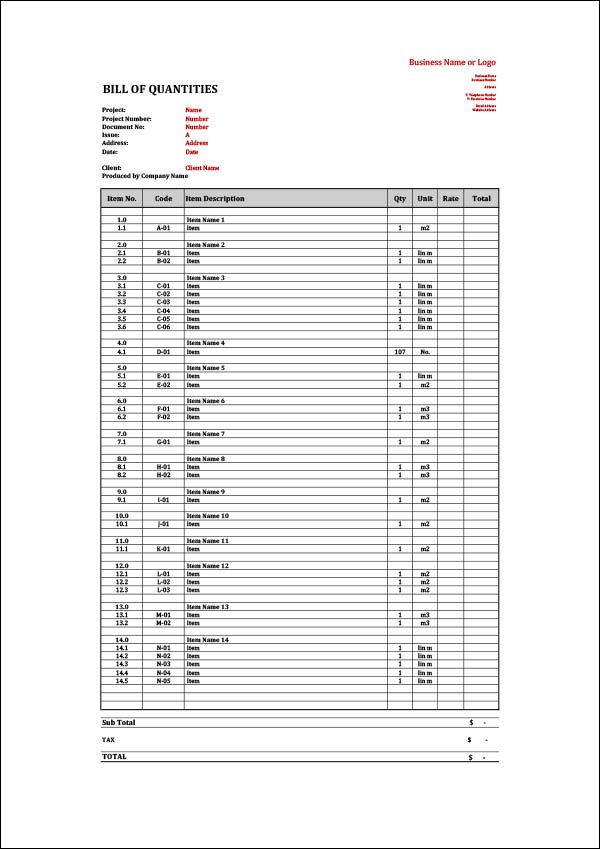
Free Bonus No.1 – Tender Assessment Comparison Template
When you purchase the Bill of Quantities Template we also include a Tender Assessment Comparison Template free.
Tender Assessment Comparison Template
Once you have received your quotes from suppliers you can enter them into this Tender Assessment Comparison Sheet.
This will allow you to present your data professionally and also compare quotes easier.

Free Bonus No.2 – Progress Payment Certificate Template
When you purchase the Bill of Quantities Template we also include a Progress Payment Certificate Template free.
A Progress Payment Certificate Template allows you to track project expenses between your Client and Contractors.
Tracking and recording where money is being spent is critical to any project. If you don’t track payments accurately from day 1 of your project, it will quickly turn into a mess.
This could then turn into a dispute with your client and contractor. Avoid disputes at all costs.
Can you really afford to not track payments accurately?
This template is provided in both MS Excel and MS Word formats.
Review the template included below.
These templates are created in Microsoft Excel file format for easy download and use.
All 3 templates are included in the one download for the one price.
Progress Payment Certificate Template

Total Inclusions
Bill of Quantities
Microsoft Excel .xlsx
Tender Assessment Comparison Template
Microsoft Excel .xlsx
Certificate of Payment Template
Microsoft Excel .xlsx
&
Microsoft Word .docx
What Our Customers Are Saying
by Tariq
David,
You and your team have done an awesome job with the site and these templates. They are really useful and a time saver. I wish if you could divide them in different categories and have different bundles, it might be easier for users to navigate and decide which one to buy.
Anyway, awesome site, awesome content, and thank you for helping me out.
Best regards,
Tariq
by Adam Grancell
Buying something off the internet always comes with a certain amount of risk. I had full confidence buying this template from you because firstly it is through Paypal and secondly, you offer a 100% money back guarantee if I am not happy.
However, I didn’t need to request a refund because it was perfect for my needs. Thank you for saving me “tons” of time!
Adam Grancell
Fast Project Systems
Canada
by Farai Mutambanengwe
Simple, hassle-free, effective!
Like other reviewers here, I too was looking for a no-frills Standard Operating Procedures template, and when I got to David’s site, that was exactly what I saw, a purpose-made template that cuts to the chase and delivers exactly what any small business needs. Dave was also able to respond very quickly and generously to a peculiar request that I made via e-mail, so you can be assured there is a great human face behind the site 🙂 . Totally delighted with my purchase, and I strongly recommend these templates particularly for small and growing businesses looking to standardise their processes quickly.
by Joumana
Thank you I have seen your YouTube videos and they have been a great help to me. Thanks.
Joumana.
by Lee
Thank you! I love the document and it is perfect for what I am working on.
Sincerely,
Lee
Fast, Professional Results – No Hassle
Time-Saving Templates for Busy Professionals
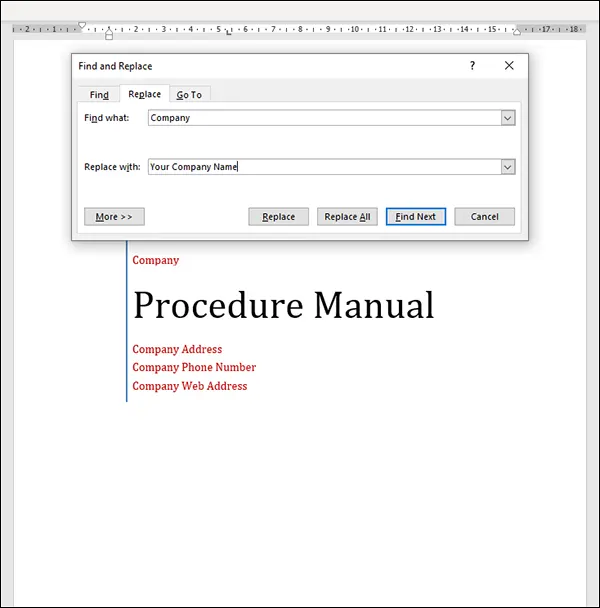
Our templates are built for speed and simplicity. Just open them in Microsoft Word, follow the red highlights, and
customize them to fit your business in minutes.
Red Highlights Make Editing Easy
Every section that needs your input is clearly marked in red. You can:
Use Find and Replace (Ctrl+H) to update everything in one go,
or
Scroll through and edit each red-highlighted item manually.
No guesswork. No confusion. Just fast, accurate customization.
Risk Free 100% Full Money-back Guarantee
Guarantee #1 – Our Rock-Solid Promise
We’re confident our templates will save you time and improve your business. But if you’re not completely satisfied for any reason,
we’ll give you a full refund – no questions asked.
Our templates are designed to streamline your document creation process, helping you work faster, smarter, and more efficiently.
And if they don’t deliver, you’re fully protected.
No strings. No stress. Just results – or your money back.
Easy to Purchase ✔
Instant Download ✔
100% Safe and Secure Checkout ✔
Simple to Customize & Use ✔
90-Day Full Money-Back Guarantee ✔
No Questions Asked ✔
Guarantee #2 – PayPal Buyer Protection

Your purchase is also protected by PayPal Buyer Protection.
This means you can pay with confidence, knowing that if anything goes wrong, PayPal will ensure you receive a full refund.
Whether you’re using a credit card or PayPal balance, you’re backed by one of the world’s most trusted and secure payment systems.

You can download the templates instantly after purchase.

USD $17.00
Shop with Full Confidence
90-Day Full Money-back Guarantee
Can you really afford to compare quotes by winging it and hoping for the best?
Take action now and use this template to save time and money while obtaining accurate information to make informed decisions.
Using templates saves a huge amount of time.
All the best with your project.
Regards,

David
P.S. The price of our products do rise based on upgrades, improvements and demand. We encourage you to buy today not only to avoid missing out at this price, but also to save time and money creating a bill of quantities.
Frequently Asked Questions Bill of Quantities
What is a Bill of Quantities?
A Bill of Quantities (BOQ) is a structured document used to list and quantify the work, materials, labour, and other items required for a construction project. It can be used to help contractors and project managers price work, compare quotations, prepare tenders, and track project costs.
What should be included in a Bill of Quantities?
A Bill of Quantities typically includes item descriptions, item numbers, units of measurement, quantities, rates, and amounts. Depending on the project, it may also include sections for labour, materials, preliminaries, subcontractor work, variations, and other project costs.
Why is a Bill of Quantities important?
A Bill of Quantities provides a consistent structure for identifying and pricing the work required for a project. It can make it easier to compare contractor prices, identify the quantities being allowed for, calculate project costs, and keep pricing information organised.
How do I receive the files?
Immediately after payment, you will receive an email with a link to a .ZIP file. Simply download and “Unzip” the folder to access all the Word and Excel files.
Do I need a PayPal account?
No. You can pay securely with any major Credit Card (via Stripe) or use PayPal if you prefer.
Is this complicated software or a subscription?
No. This is a standard Microsoft Word document. There are no monthly fees, no logins, and no complex software to learn. You buy it once, you own it forever.
Can I customise this Bill of Quantities Template?
Yes. The Bill of Quantities Template can be customised in Microsoft Excel to suit your project, trade, construction work, pricing structure, units of measurement, materials, labour, and other requirements.
Will unexpected fine print charges be added to my order without my knowledge?
No. There are no further charges. No monthly subscriptions either. You have the right to use the templates within our terms of agreement of purchase. There are no hidden charges. Similarly, what you see above is the only and final fee.
Will anyone respond if I have problems after buying?
Yes. However, there may be a delay in our response. Depending on your country timezone, we will respond as soon as we can. Please note, we aim to respond to your requests within the shortest possible time.
Will it be easy to dispute or cancel my transaction?
Yes. If you are not 100% satisfied with your purchase, we will refund your money 100%. However, we would love some feedback from you so we can improve our product should you believe it could be better.
I did not receive a download link after paying
Please do not panic. e-Junkie is a reliable document delivery system and it is unlikely this will occur. The file you are downloading is a .ZIP file. However, if you have any issues, we will email you the download link as soon as we can.
The website briefly redirected through e-Junkie. Is this safe?
Yes, it is safe. When you click on the Proceed to Pay button, you will be redirected briefly through e-Junkie.com to Paypal.com or Stripe.com (Credit Card Payment) depending on how you choose to pay. We use e-Junkie to deliver our documents electronically so you receive them immediately – 24 Hours a day, 7 days a week.
Can I use this Bill of Quantities Template for construction projects?
Yes. A Bill of Quantities is commonly used for construction and other project-based work where quantities of materials, labour, or work items need to be measured and priced. The template can be adapted to suit different types of construction projects and trades.
Can I use the Bill of Quantities for tendering?
Yes. A Bill of Quantities can be used as part of the tendering and pricing process to provide contractors with a structured list of work items and quantities to price. It can also make submitted prices easier to compare.
Is this a Microsoft Excel template?
Yes. The Bill of Quantities Template is provided as a Microsoft Excel spreadsheet. You can open it, enter your own project information and quantities, and customise the spreadsheet to suit your requirements.
How can a Bill of Quantities help with project cost control?
A Bill of Quantities provides a clear breakdown of the work and quantities being priced. This can make it easier to identify where costs are coming from, compare prices, monitor changes, and keep project pricing organised as the work progresses.
Bill of Quantities Template – What Should It Include?
A Bill of Quantities (BOQ) is a structured document used to list the work, materials, labour and other items required for a construction or project-based job. It provides contractors, subcontractors and suppliers with a consistent list of items to price.
A well-prepared Bill of Quantities Template can make the tendering and quotation process much easier because each contractor is pricing the same scope of work.
Instead of receiving several quotes that are structured completely differently, you can provide each contractor with the same Bill of Quantities and ask them to enter their price against each item.
This gives you a much clearer basis for comparing the prices you receive.
What Is a Bill of Quantities?
A Bill of Quantities, often referred to as a BOQ, is a detailed schedule of work items and quantities required for a project.
It is commonly used in construction, building, civil works, engineering, landscaping and other projects where materials, labour and work activities need to be measured and priced.
A typical BOQ may include:
- Item numbers
- Description of work
- Materials
- Labour
- Units of measurement
- Quantities
- Unit rates
- Total amounts
- Subcontractor work
- Plant or equipment
- Preliminaries
- Other project costs
The exact structure will depend on the type and complexity of the project.
What Should Be Included in a Bill of Quantities?
The purpose of a BOQ is to clearly identify what needs to be priced.
A Bill of Quantities Template in Excel can therefore include columns for the description of each item, the unit of measurement, quantity, rate and total amount.
For example, a construction Bill of Quantities could contain items such as:
| Item | Description | Unit | Quantity | Rate | Amount |
|---|---|---|---|---|---|
| 1.1 | Site preparation | m² | 500 | $ | $ |
| 1.2 | Excavation | m³ | 120 | $ | $ |
| 1.3 | Concrete works | m³ | 80 | $ | $ |
| 1.4 | Reinforcement | kg | 4,500 | $ | $ |
| 1.5 | Formwork | m² | 350 | $ | $ |
The actual items and quantities will obviously vary from project to project.
The important point is that each contractor receives the same information and is asked to price the same work.
BOQ Template for Construction Projects
A construction Bill of Quantities is particularly useful when several contractors or subcontractors are being asked to provide prices for the same project.
Without a BOQ, contractors may interpret the scope differently.
One contractor might include an item that another contractor has excluded. Another might make a different allowance for quantities, materials or labour.
This can make it difficult to determine whether the cheapest quote is actually the cheapest.
A BOQ provides a common pricing structure.
Each contractor can work from the same list of items, quantities and units, making the resulting quotations easier to assess.
Using a Bill of Quantities for Tendering
A Bill of Quantities for tendering can form an important part of the tender documentation for a project.
The process can be relatively straightforward:
- Prepare the list of work items.
- Enter the required quantities and units.
- Provide the BOQ to the contractors or suppliers.
- Ask each contractor to price the same items.
- Receive the completed pricing schedules.
- Compare the submitted rates and total prices.
- Investigate significant differences or exclusions.
- Select the contractor based on price, scope, capability and other relevant factors.
This gives you more information than simply asking several contractors, “What will this project cost?”
Bill of Quantities vs Quotation
A quotation is a price submitted by a contractor or supplier.
A Bill of Quantities is the structured list of work and quantities that can be used as the basis for obtaining and comparing those prices.
For example, asking five contractors for a quote without providing a detailed scope may result in five very different documents.
Providing the same BOQ to all five contractors gives each of them the same list of items to price.
This makes the comparison much more meaningful.
Comparing Contractor Quotes
One of the main reasons for using a BOQ template is to make contractor quote comparison easier.
Suppose three contractors submit the following totals:
- Contractor A – $185,000
- Contractor B – $172,000
- Contractor C – $191,000
At first glance, Contractor B appears to be the cheapest.
But the total price does not tell you everything.
Contractor B may have excluded work that Contractors A and C included. There may also be significant differences in individual rates or allowances.
By comparing the individual BOQ items, you can investigate those differences rather than making a decision based solely on the final total.
Tender Assessment and Quote Comparison
A BOQ can be used together with a Tender Assessment Comparison Template to make the tender evaluation process easier.
Once contractors return their completed pricing, the information can be transferred into a tender comparison spreadsheet.
You can then compare:
- Total tender price
- Individual item rates
- Major cost differences
- Allowances
- Exclusions
- Variations in quantities
- Missing items
- Other relevant tender information
Price is only one factor when selecting a contractor, but having the pricing information organised makes the overall assessment easier.
BOQ and Quantity Takeoff
A quantity takeoff is the process of determining the quantities of materials, labour or work required for a project.
For example, a project may require quantities for concrete, excavation, reinforcement, paving, walls, roofing, electrical work, plumbing or other construction activities.
The quantities identified during the takeoff can then be entered into the Bill of Quantities.
The quality of the BOQ depends heavily on the accuracy and completeness of the information used to prepare it. A template provides the structure for recording the information, but the project-specific quantities still need to be determined appropriately.
Bill of Quantities for Project Cost Control
A BOQ can also provide a useful reference point once a project is underway.
The original quantities and prices can be used to help monitor project costs and identify changes.
If the scope changes, additional work is required or quantities vary significantly, those changes can be recorded and assessed against the original pricing information.
This can make it easier to understand where project costs are coming from rather than simply looking at the overall amount spent.
Progress Payments and Certificates of Payment
A Bill of Quantities can also be useful when dealing with progress payments.
Where payments are based on completed work, the original BOQ can provide a schedule against which completed quantities and amounts can be assessed.
This is where the included Progress Payment Certificate Template can be useful.
It provides a separate document for recording and presenting payment information between the relevant parties.
The exact payment process will depend on the contract and project arrangements.
Bill of Quantities in Excel
An Excel Bill of Quantities Template is particularly useful for projects where quantities, rates and amounts need to be changed or updated.
Microsoft Excel allows you to:
- Add or remove items
- Change quantities
- Enter contractor rates
- Calculate amounts
- Add project-specific descriptions
- Organise work into sections
- Compare pricing
- Customise the spreadsheet to suit the project
Using an existing Excel template also means you do not have to build the spreadsheet structure from a blank workbook.
BOQ Template for Small Businesses and Contractors
You do not have to be working on a major construction project to use a Bill of Quantities.
A smaller contractor, project manager, builder, developer or business owner may also use a BOQ when requesting prices for a defined scope of work.
The level of detail should be appropriate to the project.
For a simple project, a relatively straightforward list of items and quantities may be enough. More complex projects may require a much more detailed breakdown.
The template can be customised to suit the way you manage your own projects and tendering process.
Why Use a Bill of Quantities Template?
Creating a BOQ from scratch can take considerable time, particularly when you need to prepare the same type of pricing schedule regularly.
A Bill of Quantities Template gives you an existing Excel structure that you can adapt to your project.
Instead of starting with a blank spreadsheet, you can enter your project information, add or remove items and customise the template to suit your requirements.
The biggest benefit is not the spreadsheet itself.
It is having a consistent way to define the work, request prices and compare the information that comes back.
Download a Bill of Quantities Template – Instant Access
USD $17.00
Shop with Full Confidence
90-Day Full Money-back Guarantee